Reading JourneyMap's chunk cache
Unfinished article
Why even..
I've been mapping out one Minecraft server hosted by some YTber that primarily plays on beta-like modpacks.
That server was obviously themed like one as well, with some restrictions on what mods clients are allowed to use. Most notably, no "meta-gaming", even though ruleset doesn't necessarily explain that:
------------------[ 1 / 2 ]------------------
No cheating!
No major/consistent griefing! (lava casts, base destruction, etc.)
No consistent stealing! (stealing from players chests regularly)
Beefing is allowed if the third side is not included
                      Next >>
---------------------------------------------
------------------[ 2 / 2 ]------------------
Occasional theft is allowed
Occasional/light griefing is allowed (breaking torches, doors, paintings, armor stands)
Red nickname - controlled griefer group, yellow - controlled cheater group
<< Back
---------------------------------------------
I guess "No cheating!" kinda counts as meta-gaming, even though it's pretty vague.
What it means is that you're really not supposed to use minimaps or any other external tools to assist your gameplay. Yes, even JEI/EMI/etc fall under that.
Anyways, after installing mod hider and adding JourneyMap (as well as some other definitely allowed mods) to the hidden list and mapping a huge area, we get this:
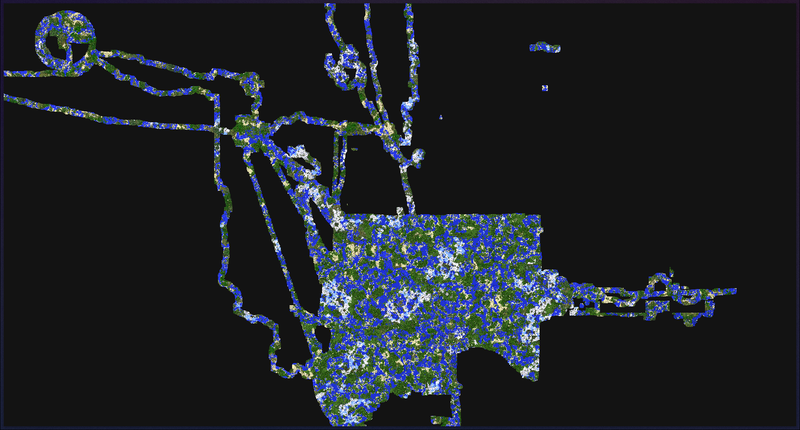
Screenshot of the web map I wrote a bit after
You could probably notice a suspiciously circular area except it's not mapped out fully. That was my attempt at stream-sniping the admin and mapping out his area. The reason it's not fully mapped is that after this, he decided to inflict withering and slowness to everyone inside that circle. Lame!
I basically gave up playing on it after that, but there are some people that still use my minimap and send me updated region screenshots!
With latest update I also noticed new files alongside regular PNGs: chunk_cache.
*.jmc
chunk_cache is per-dimension folder that contains chunk cache in JMs proprietary
file format. Chunk cache files are grouped into regions, the same way it works in
regular Minecraft.
Unlike regular regions, .jmc files don't store NBT data and seem to only care
about block data (with variants), as well as light levels. Basically, most of
things you'd need to render a map from scratch.
.jmc files (from now on I'm gonna call them by their header magic: JMCA) are even structured the same way as regular region files: header
contains offsets and sizes of each chunks' data. JMCA header also includes region position (which is absent in McRegion files), as well as a couple unused fields which
might see a light in the future (I sure hope not, I don't want to make any changes to my reader, especially with backwards compatibility).
Unlike McRegion, chunks in JMCA are not "page"1-aligned, which saves a bit on space. JMCA also only supports zLib compression[citation needed]
In short, JMCA header can be represented as this C struct:
struct __attribute__((__packed__)) JMCA_Header {
    char magic[4]; // 'J', 'M', 'C', 'A'
    uint8_t unused1[2];
    int16_t region_x;
    int16_t region_z;
    uint8_t unused2[6];
    int32_t offsets[32 * 32];
    int32_t lengths[32 * 32];
};
All numbers are network(big)-endian.
Chunks' data can be accessed by seek()ing to its offsets[cx + cz * 32] and read()ing lengths[cx + cz * 32] bytes,
and then inflating it with zLib.
Each chunk could be thought as a separate file with a separate magic and stuff.
JMCS
Each chunks' data starts with JMCS magic value, format and sections information,
followed by sections data. Again, structured similarly to McRegion chunks, except
chunks are not stored as NBT this time. In fact, I don't think there's any NBT
in .jmc files at all!
struct __attribute__((__packed__)) JMCS_Header {
    char magic[4]; // 'J', 'M', 'C', 'S'
    uint8_t version; // Only 3 and 4 are present at the moment of writing this
    int32_t min_section;
    int32_t min_build_height;
    int32_t max_build_height;
    uint8_t section_count; // No. of sections actually stored in the file
};
Number of sections is derived from *_build_height: (max_build_height - min_build_height) >> 4.
Note that this is not "how many sections are stored in the file", but how many sections
there could be in each chunk. You should only read section_count sections.
This value is used to reject sections that are outside of buildable range.
Header is followed by sections data that can't be represented by a C struct, but I'll try anyways!
struct JMCS_Section {
    uint8_t section; // Actual value is min_section + section
    int32_t palette_size;
    struct JMCS_Palette_Entry {
        UTF_String name;
        uint8_t n_properties;
        struct JMCS_Palette_Property {
            UTF_String key;
            UTF_String value;
        } properties[n_properties];
    } palette[palette_size];
    uint16_t indices[16 * 16 * 16 * 2];
};
UTF_String is that weird aah format that Java uses: unt16_t length followed by "modified UTF-8" string.
Reader MUST read section data even if
sectionvalue is outside of buildable range.
// TODO: finish this
Footnotes
Chunk data in McRegion .mca files is aligned to 4kiB pages for some reason.
Each chunk can also only have 255 pages, so compressed chunk size is limited to just under 1MiB2, which is REALLY not a lot for Minecraft (especially modded one).
I've personally ran into that problem on my modded Minecraft server that had a bunch of items in SophisticatedStorage chests, which caused light data to not save.
I had to move everything to SophisticatedBackpacks, since they only store storage UUIDs and not items themselves.
APPARENTLY it's not supposed to do that! It should instead write chunk data to .mcc files instead of storing them in the region itself.
Source: Minecraft Wiki: Region file format